FOR SMALL GCs & REMODELERS · 1–15 CREW

The job you bid is the job you get paid for.

Project management built around fixed-price contracts — signed change orders, draw schedules, clean QuickBooks sync.

$199/mo flat · whole company · price locked at signup, forever
watch a job run · 0:24 ↓

No demo call. No "contact sales." No per-seat math.

JobFolder app — Maple St kitchen job with fixed-price contract, three change orders, margin gauge and QuickBooks sync
THE JOB VIEW — CONTRACT · CHANGE ORDERS · DRAWS · MARGIN
FIG. 00 — ONE JOB, START TO PAID · 0:24

Watch the contract do the arguing for you.

ESTIMATE — Maple St Kitchen0:00
Demo & disposal$3,800
Cabinets, supply & install$19,400
Counters — quartz, templated$8,100
Electrical & plumbing, per plan$9,700
Paint, trim, punch list$7,500
FIXED PRICE$48,500
SIGNED — BOTH PARTIES
TEXT FROM CLIENT · WEEK 3
"While the walls are open — could we get outlets in the island? And honestly the pot filler too 😅"
CHANGE ORDER 01CO-01
Island circuit + 2 outlets$1,140
Pot filler rough-in + valve$710
ADD TO CONTRACT+$1,850
APPROVED — CLIENT, 7:02 PM
PAID

Tuesday, 4:12 pm — you price the kitchen. JobFolder turns the estimate into a signed fixed-price contract.

FIG. 01 — FIXED-PRICE NATIVE

Contracts and change orders are the product. Not an add-on.

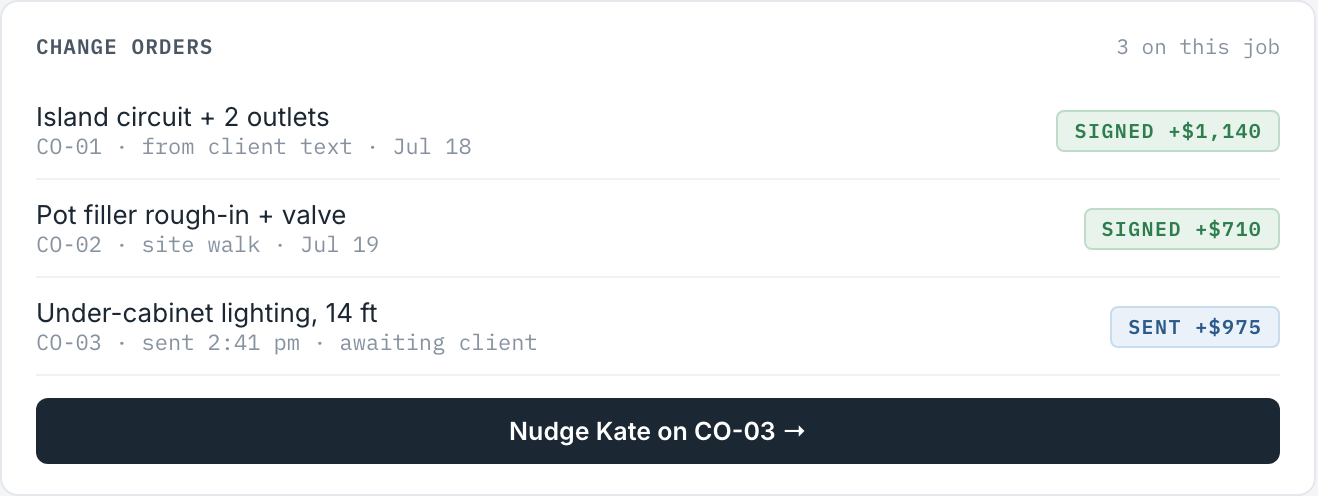
Every "while you're here" becomes a priced change order, signed on the client's phone before the work happens. The contract total moves with the scope.

Change orders panel — two signed, one sent awaiting client signature
FIG. 02 — DRAWS & QUICKBOOKS

Draw schedule in. Clean books out. Zero re-typing.

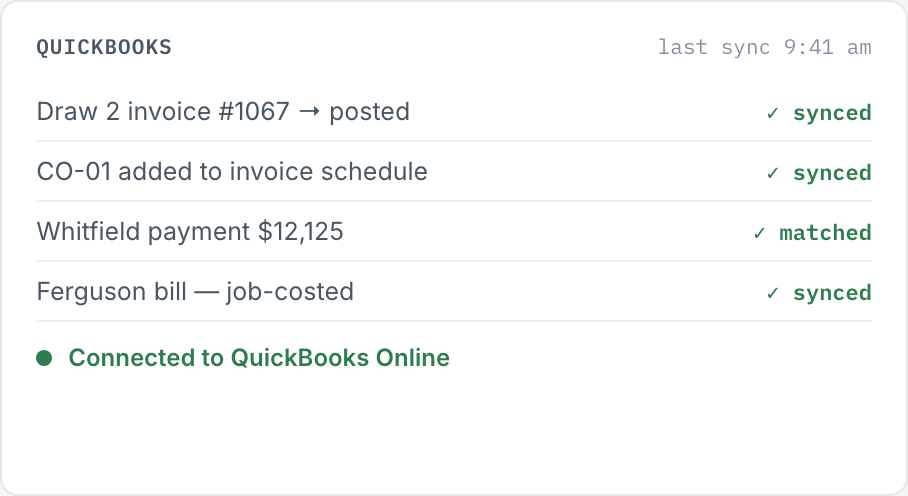
Draws invoice themselves on their triggers. Payments, COs, and vendor bills land in QuickBooks correctly categorized, once. No export-fix-import Sundays.

QuickBooks panel — invoices, payments and bills synced and matched
FIG. 03 — THE MARGIN GAUGE

Know you're losing money in week 2, not at tax time.

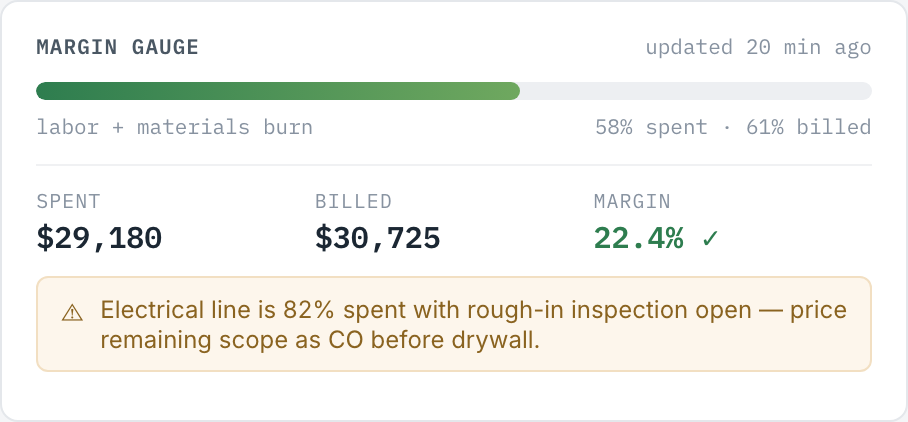
JobFolder tracks burn vs. contract per job and warns you while there's still time to write a change order — not after the margin is gone.

Margin gauge — 58% spent, 61% billed, 22.4% margin, with an early warning on the electrical line
FIG. 04 — THE SAME JOB, TWICE

The job you bid is rarely the job you build. It should still be the job you bill.

WITHOUT — HOW IT USUALLY GOES
  • "Sure, we can add the outlets" — never priced, never signed
  • Change requests live in texts, three apps deep
  • Draws invoiced late, from memory
  • QuickBooks catch-up every other Sunday
  • Extras discovered at final walkthrough — awkward, unpaid
$5,150 of extra work · $0 billed
WITH JOBFOLDER — SAME JOB
  • Every ask priced & signed before the work — 3 change orders
  • Contract total moved with the scope: $48,500 → $53,650
  • Draws invoiced on trigger, on time
  • Books already clean — nothing to catch up
  • Final invoice: zero surprises, zero arguments
$5,150 of extra work · $5,150 billed
MARGIN HELD
FIG. 05 — THE PRICE

One number. It doesn't move. Ever.

You run fixed-price jobs. Why is your software cost-plus?

$199/mo · whole company
🔒 PRICE LOCKED AT SIGNUP — YOUR RATE NEVER RISES
  • Unlimited users — office, field, subs
  • Unlimited jobs, contracts & change orders
  • E-signatures included (no DocuSign bill)
  • QuickBooks Online sync included
  • Free white-glove import from Buildertrend / JobTread / spreadsheets
  • 14-day free trial · month-to-month · cancel anytime

No credit card to start. No demo call. No sales rep named Chad.

Buildertrend (Essential → renewal)$499+/mo, quotes rise at renewal
JobTread$150–200 /user/mo
JobFolder$199/mo flat, locked
FIG. 06 — STRAIGHT ANSWERS

Questions small GCs actually ask.

We're mid-job in Buildertrend. How painful is switching?

You don't re-type anything. Send us an export (or your login) and we migrate active jobs, contacts, and open invoices for you during the trial — that's the white-glove import. Most crews run one job in JobFolder alongside the old tool before moving everything.

Does it handle cost-plus or T&M jobs too?

Yes — but honestly, fixed-price is the workflow we obsess over. If 90% of your work is cost-plus, Buildertrend's model may fit you better. If you quote a number and have to defend it, that's who we built this for.

How does the QuickBooks sync actually work?

One-way by default: contracts, draws, change orders, and payments post to QuickBooks Online as properly categorized invoices and payments the moment they happen. No CSV exports, no duplicate customers, no re-mapping accounts every month.

$199 flat for unlimited users — what's the catch?

The catch is we don't have a sales team, demo calls, or conference booths, so you're not paying for them. Flat pricing is also a bet: small crews shouldn't do per-seat math every time they hire a lead carpenter.

Is this another AI tool?

AI is in there where it saves typing — drafting change-order line items from a text or photo, catching unbilled scope. There's no chatbot, no copilot branding, and no "AI fee."

Do my clients need an account to sign?

No. Change orders and contracts go out as a link; clients review and sign on their phone. You see the timestamped signature in the job folder, and the contract total updates itself.